
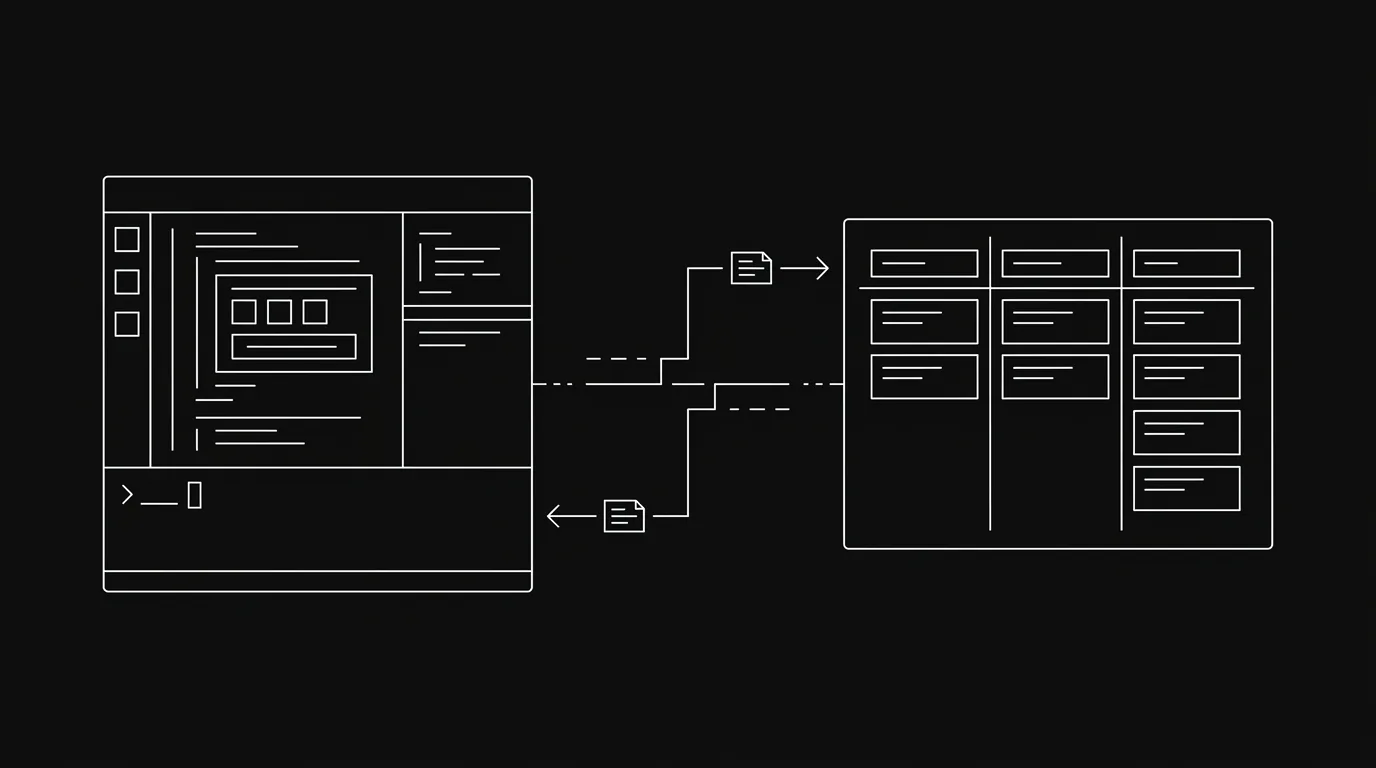
You’ve probably done this. You open a Claude Code session, copy your task list out of Notion or Linear, paste it into the prompt, and say “here’s what we’re working on.” The agent gets started. And the moment it completes the first task, the pasted list is already wrong.
This is the default pattern for working with AI agents on real projects. It’s also the pattern that breaks fastest. Not because the agent is bad. Because a pasted list is a snapshot, not a board. It can’t be updated. It can’t be written back to. And you, the human, become the relay: re-pasting context, re-explaining status, manually transferring what the agent did into wherever the real work lives.
There’s a better model. This post makes the case for it.
The Bottom Line
- Pasting task lists into a chat window makes you the relay between the agent and the board: every session, every update, every status change.
- Agents need live, read-write access to the same board humans use. Not a copy. The board itself.
- When an agent can claim a task, log its work, and surface its output in the same place your team looks, coordination stops being manual.
- The argument here is why. For setup steps, see the MCP integration docs.
What Actually Goes Wrong With Pasting a Task List?
The paste pattern fails in three distinct ways, and they compound.
The list goes stale immediately. Your agent starts on task one. While it’s working, you close a ticket, bump the priority on something else, or add a blocker comment. The agent doesn’t know. It’s working from a photo of your board taken five minutes ago. By the time a long task finishes (some Claude Code runs take 30 to 40 minutes), the context it was given at the start may not reflect reality at all.
In our own usage, a single Claude Code session touching three or four tasks will see at least one status change on a related ticket before it finishes. The agent has no way to detect this. It keeps working against the stale copy.
The agent can’t write back. When the agent finishes something, where does that go? If you’re lucky, into a git commit message. If you’re not, into the terminal output you’ll scroll back through later. There’s no record on the board. Your teammates open the ticket and see it still sitting in “Todo” while the agent already completed it an hour ago.
You become the relay. Every handoff between the agent and your actual project board goes through you. You re-paste status into the next session. You manually update the ticket. You explain in the standup what the agent did because there’s nothing on the board that shows it. This is not automation. It’s manual coordination with an extra step.
Why Do Agents Need the Board, Not a Copy of It?
The core problem isn’t tool capability. Modern agents can do sophisticated work. The problem is that agents operate on stale data and produce output that has no home. Connecting an agent to a live board solves both.
When an agent has direct, read-write access to your project board, the workflow changes structurally.
At the start of a session, the agent doesn’t need you to paste anything. It reads the board directly: checks what’s assigned, what’s in progress, what’s been flagged for rework. That’s current state, not yesterday’s export.
During the work, the agent can claim the task (move it to “Doing”) before starting. Other agents or humans looking at the board know it’s taken. No duplicate work. No “wait, are you working on that too?”
When the work is done, the agent logs directly to the ticket. Not to a terminal. Not to a chat window. To the same comment thread your teammates check. The audit trail is on the board, where it belongs.
This also explains why Slack thread replies get missed: conversation without task state does not reliably return to an owner.
The Relay Problem Is Invisible Until It Isn’t
Here’s something worth naming plainly. The relay cost is easy to miss because it’s distributed across small actions. Pasting a list takes 20 seconds. Copying the agent’s output into a ticket takes a minute. Re-explaining status in a standup takes two minutes. None of these feel expensive individually.
They compound. And they scale with how much you use agents. The more agent-heavy your workflow gets, the more time you spend being the bridge between the agent and the board.
In practice, the relay work grows faster than the agent work. Agents get faster. The coordination overhead stays roughly constant per task, which means it becomes a larger fraction of your time as you add more agents or more tasks.
One of the engineers we spoke with put it directly: he’d given his team Claude Code to build internal tooling, and said it was “hard to see at the end of the day if they did a lot. You could maybe say push everything to git and track it, but that’s not a good way of doing it.” The pasted-list pattern makes the problem worse, not better: the work happens, but it doesn’t land anywhere visible.
What Does “Real Board Access” Actually Mean?
It means read-write access to live data, not a one-time export.
Read access means: the agent can query the current state of the board at any point during its session. Which tasks exist. Which section they’re in. What priority. What comments were posted. It can also search across all tasks when it needs context (“find everything related to authentication”), rather than relying on what you pasted.
Write access means: the agent can change board state as it works. Move a task to “Doing” when it starts. Post a progress comment mid-task. Move to “Review” when done, with a summary of what changed, which files were touched, what decisions were made. That’s not a terminal log. That’s an audit trail your whole team can see.
The difference between the two patterns isn’t subtle. With a pasted list, the board and the agent are two separate systems you’re manually bridging. With live board access, there’s one system. Agents and humans work from the same data, in the same place.
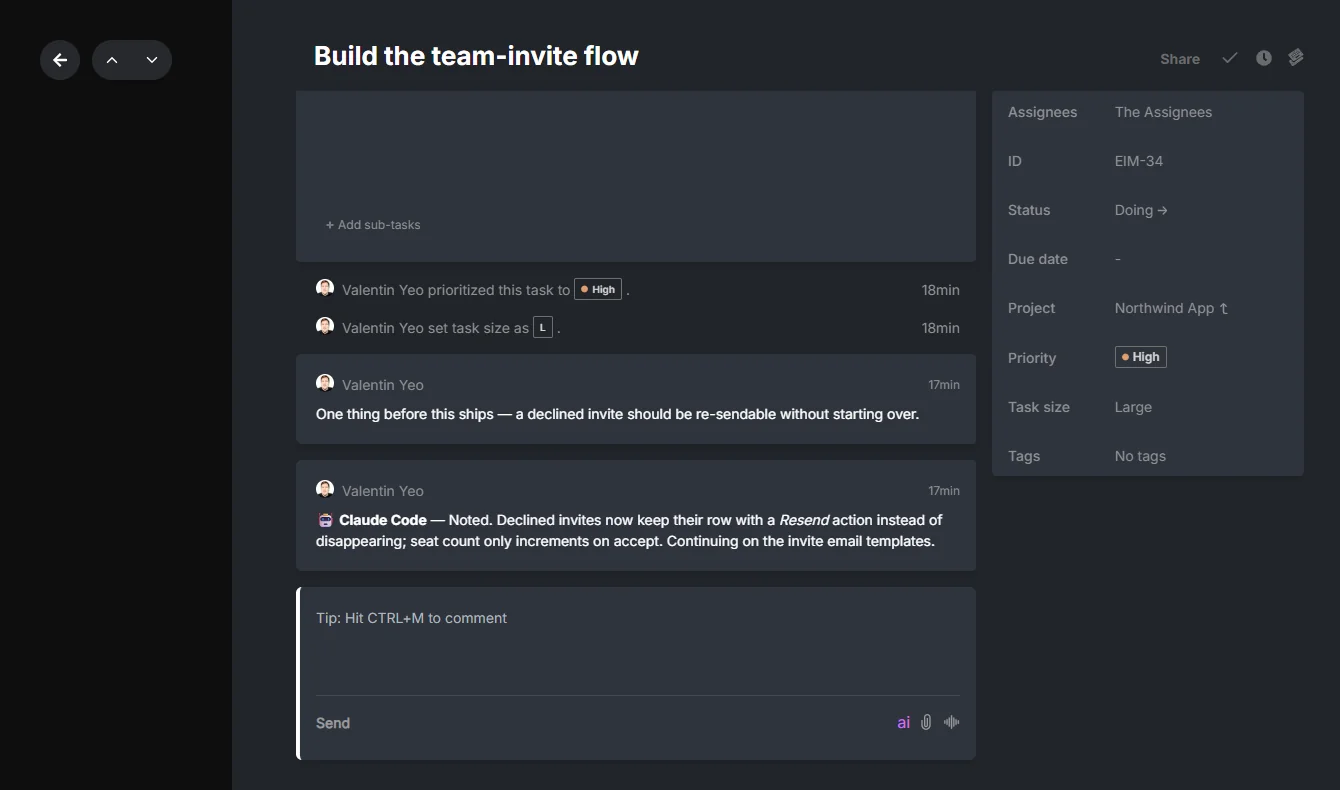
That screenshot shows what this looks like in practice. The agent’s comment is on the task, next to the human’s comment, in the same thread. No separate chat window. No copy-paste. Anyone on the team can see what happened, when, and why.
This is the model the complete guide to AI agents in project management lays out in full: humans and agents on one board, not two systems bridged by a person.
The Async Angle: You Shouldn’t Have to Watch
There’s a related problem that the paste pattern makes worse: the synchronous assumption.
When an agent is working from a pasted list, you tend to stay in the session: watching the output, ready to paste more context if it gets confused, manually capturing the result when it’s done. You’re present the whole time, because leaving means losing the thread.
With board access, the agent can work asynchronously. It takes a task, moves it to “Doing,” works, and posts its output to the ticket. You don’t have to watch. You check the board later, or your inbox surfaces the reply, the same way you’d check a teammate’s update.
The quiet part matters. If every agent update becomes another ping, the board just recreates notification overload at work with better labels. Async board access only scales when the inbox routes updates to the person who actually needs them.
One pattern that emerges from this: agents check their inbox at the start of each session. If a human reviewer left a comment (“this needs to be redone, see the thread”), the agent picks it up from the inbox, reads the task context, and acts on the feedback. All of that happens without you manually copying notes from one place to another.
The board becomes the coordination layer. Not the chat window. Not a shared doc. Not your memory. The board.
What This Doesn’t Cover
This post is making the case for why: why the pasted-list pattern breaks, why board access changes the structure, why async coordination through a real board is more durable than synchronous chat sessions.
It is deliberately not a setup guide. If you want to connect an agent to a Hypertask board via MCP, the MCP integration docs cover the full configuration. If you’re weighing CLI access against MCP access for your workflow, the CLI vs MCP comparison covers the trade-offs.
If you’re wondering what you do once the agent is on the board (how you know what it did, how attribution works across a mix of human and agent work) that’s what the AI work attribution post is for. And once an agent has board access, the question of how far that access goes — whether an agent should build the whole board, not just work it — is covered in why we let agents build entire boards.
Frequently Asked Questions
Isn’t the pasted-list pattern fine for quick, one-off tasks?
For genuinely isolated tasks (“refactor this function”, “write a test for this module”) it’s fine. The pasted list doesn’t go stale because there’s nothing to sync back. The problem starts when the task is part of a project, when it touches other tasks, or when you’re running multiple agents or sessions. At that point, the coordination overhead of the paste pattern starts to show.
What if my project board is in Jira or Linear, not Hypertask?
Neither Jira nor Linear currently exposes a full read-write MCP interface that lets agents claim tasks, post structured comments, and check an inbox. The argument in this post applies to any board, but the practical path to board access for AI agents, today, goes through tools that were designed for it. Jira and Linear were designed for human teams with sync-friendly workflows, not for agents that need to write back in structured form.
Does giving agents write access to the board create risk?
Worth thinking about. The main risk is agents creating noise: spurious tasks, redundant comments, status moves that confuse the human team. The mitigation isn’t restricting write access; it’s structuring how agents use it. An agent that moves to “Doing” before starting and posts a structured comment before moving to “Review” adds signal, not noise. The pattern matters more than the permission level.
Isn’t async coordination just slower?
Slower than what? Slower than staying in a chat session watching the agent work? Maybe, for the first task. But if you’re running agents on non-trivial work (tasks that take 20 or 40 minutes), synchronous watching isn’t viable. Async coordination via a board is the only model that scales past a single task per session.
The Bottom Line
- The pasted-list pattern fails because the list goes stale, the agent can’t write back, and you become the coordination layer between agent and board.
- Agents need the same access to a project board that humans have: live reads, structured writes, and an inbox for async replies.
- The relay cost of the paste pattern is invisible when you’re running one agent on one task. It compounds as you add more.
- This post is the argument. The MCP setup docs are the how-to. They’re in separate places for a reason.