

AI agents in project management means giving autonomous AI systems — Claude Code, Cursor, custom agents — the same structured access to your task board that your human teammates have: read tasks, claim work, post progress, move tickets, and reply to feedback, all without a human in the loop for every step.
Why Standard Project Management Tools Break for AI Agents
Most project management tools were designed around one assumption: a human is reading the board and deciding what to do next. That assumption is wrong for AI agents.
When you drop Claude Code or a similar agentic tool into a workflow built around Notion, Jira, or a shared Google Doc, the agent can’t navigate a visual interface. It can’t click “New task.” It can’t read a Notion page without being copy-pasted to it. And it has no way to report back that it finished something without you checking on it manually.
The result is a constant translation layer. You describe work to the agent in a terminal prompt. The agent does the work. You update the board yourself. You check the board to figure out what to assign next. That’s two jobs — one for you, one for the agent — where there should be one.
This isn’t a workflow problem you can patch with a better prompt. It’s an infrastructure problem. Agents need structured programmatic access to the same board humans use — not a copy of it, not a separate system, the same one.
The Bottom Line
- Standard PM tools assume a human is at the keyboard. AI agents need structured API or CLI access to participate in a board at all.
- The problem is not agents being bad at planning — it’s that the board has no door they can open.
- Every extra translation step between agent output and your task board is work you’re doing for free, at scale.
- The shift that matters is treating agents as first-class board participants, not as external tools you babysit.
What AI Agents Actually Need from a Project Board
Before looking at solutions, it’s worth being precise about what “agent access to a project board” actually requires. There are five things an agent needs to be a real participant in a workflow:
1. Read tasks with context. The agent needs to pull a list of open tasks, filter by priority or section, and get the full description of each. A URL to a Notion page is not enough — the agent needs structured data it can reason over without a browser.
2. Claim and update work. The agent needs to move a task from “Todo” to “Doing” when it starts, and to “Done” when it finishes. Without this, the board is always stale and nobody knows what’s actually in progress.
3. Post progress asynchronously. Agents run for minutes or hours. They need to post intermediate updates and final results as comments on the task — so humans can review output without waiting for the agent to finish or re-running it to ask what it did.
4. Respond to human feedback. When you leave a comment asking the agent to revise something, the agent needs to see that comment in its next context window. This is the foundation of async human-agent collaboration.
5. Operate without a dedicated UI. This one rules out most tools. An agent running in a terminal or a CI pipeline has no mouse, no session, no way to navigate a point-and-click board.
The infrastructure that satisfies all five requirements is either a CLI (a command-line tool the agent can invoke) or an MCP server (a structured API the agent’s host environment calls on its behalf). Everything else is a workaround.
| Requirement | Notion | Jira | Linear | Hypertask |
|---|---|---|---|---|
| Structured task read | No native CLI | REST API only | GraphQL API | CLI + MCP |
| Claim/move tasks | No | Complex API | API | CLI + MCP |
| Post async comments | No | API | API | CLI + MCP |
| See inbox / feedback | No | No | No | MCP inbox tool |
| Agent-specific handle | No | No | No | Yes (agent seats) |
The Bottom Line
- What separates “AI-ready” from “AI-sprinkled” in a PM tool is whether agents can operate without a browser.
- CLI and MCP are the two access patterns that actually work — everything else requires a human to mediate.
- Structured task data (JSON, not HTML) is the minimum bar. If the tool can’t return a task as machine-readable output, agents can’t use it reliably.
The Two Access Modes: MCP vs CLI
Once you accept that agents need programmatic access, you have two practical options: MCP (Model Context Protocol) and a CLI.
What MCP Is
The Model Context Protocol is an open standard released by Anthropic in November 2024 for connecting AI systems to external data sources and tools. The architecture is straightforward: a tool (like a project board) exposes an MCP server; an AI assistant (Claude, Cursor, Windsurf) acts as an MCP client and calls the server’s tools directly within the conversation.
For a current setup and safety checklist, see the guide to choosing an MCP server for project management.
MCP is the right choice when you want the agent’s host environment — Claude Desktop, Cursor, Windsurf — to handle the integration automatically. The agent calls hypertask_list_tasks as naturally as it calls any other tool. No shell commands, no scripting.
With Hypertask’s MCP server, agents get access to 15 structured tools:
| Tool | What it does |
|---|---|
hypertask_list_tasks | List tasks with filtering by board, section, priority, assignee |
hypertask_get_tasks | Get specific tasks by ID or ticket number |
hypertask_search_tasks | Full-text search across all tasks |
hypertask_create_task | Create a new task |
hypertask_update_task | Update title, description, priority, section, status |
hypertask_add_comment_to_task | Post a progress update or result |
hypertask_get_comments_for_task | Read human feedback on a task |
hypertask_inbox_list | Check for new assignments and replies |
hypertask_inbox_archive | Archive processed inbox items |
hypertask_assign_user | Assign or unassign team members (human or agent) |
hypertask_move_task_between_boards | Move a task to another project |
hypertask_create_board (via section tool) | Scaffold sections on a board |
hypertask_list_projects | List accessible projects |
hypertask_list_project_members | List team members |
hypertask_get_user_context | Get the agent’s own identity on the board |
What the CLI Does
The CLI is a command-line tool the agent invokes via shell. It’s more flexible than MCP for scripted workflows — agent scripts, CI pipelines, cron jobs — and it’s more token-efficient because the agent doesn’t need to parse tool call scaffolding for every operation.
A typical agent workflow in the CLI looks like this:
# Pick up the highest-priority task
hypertask inbox list
hypertask task get HTPR-2992
hypertask task move HTPR-2992 --section "Doing"

# Post a progress update
hypertask comment add HTPR-2992 --text "<p>Deployed to production. Tests pass.</p>"
hypertask task move HTPR-2992 --section "Done"
Which to Use
The short answer: MCP for conversational agents, CLI for scripted agents.
If you’re using Claude Code, Cursor, or Windsurf interactively — where the agent is in an active conversation context — MCP is cleaner. The host environment handles the connection and you get natural tool calls.
If you’re building an autonomous loop — a script that runs on a schedule, a CI step, a cron job — the CLI is more appropriate. It doesn’t require a live model conversation to operate, and it burns fewer tokens per operation.
A deeper comparison lives in CLI vs MCP — which access mode suits your agent.
The Bottom Line
- MCP works best inside AI coding environments like Claude Code and Cursor — the agent calls board tools the same way it calls any other tool.
- CLI works best for autonomous loops and scripted pipelines that run outside a live conversation.
- Both modes give agents the same board access; the difference is how that access is invoked.
- You can mix both — use MCP for interactive work and CLI for automated background tasks on the same board.
How Agents and Humans Share One Board
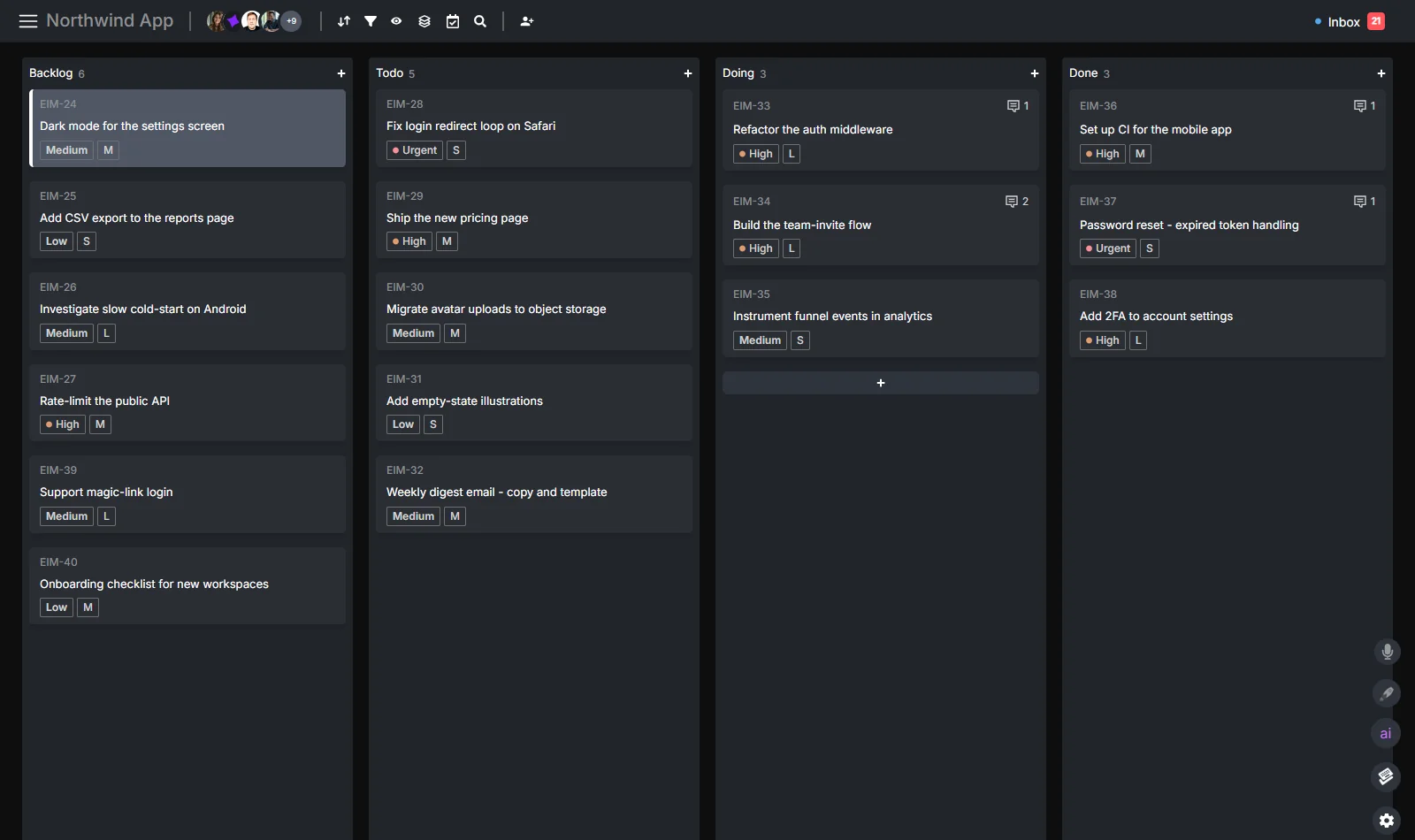
The structural challenge in AI-agent project management is not just “can agents access the board” — it’s “can humans and agents see each other’s work, in context, without separate dashboards or manual syncing.”
The answer requires a few things to be true simultaneously:
Shared task state. When an agent moves a task to “Doing,” you see it move in your board view in real time. You don’t have to check a separate log. The task’s history shows every move, who made it, and when.
Agent identity. Agents need their own handle on the board — so when Claude Code comments on a task, the comment shows as @claude, not as you. This matters for accountability: you need to know whether a human or an agent made a change.
Async communication. Agents don’t wait for you to be online. They post updates as comments on the task itself, not in a Slack thread that gets buried. When you’re ready to review, the work and the result are in the same place.
The same structure is the practical fix for replies that disappear in Slack threads: the task keeps an owner, state, and review path after the chat moves on.
Human approval gates. You stay in control. The agent can complete work and move the ticket to “Done,” but you review before anything ships. The inbox surfaces agent completions and flags anything that needs your attention.
This is the model: agents are onboarded as team members with their own seat and handle, they receive tasks the same way humans do, and they report back through the same comment thread. The board is the source of truth for both.
Tool selection still depends on where that source of truth belongs. Compare Linear with Jira for engineering work, ClickUp with Notion for tasks and knowledge, or Reclaim AI alternatives for calendar and project workflows before moving a live process.
From the Hypertask features page, the three-step model is:
- Give agents access — install the CLI or MCP server; agents start creating tasks and posting progress in under two minutes.
- One board, both sides — human tasks and agent tasks on the same Kanban board; see who’s doing what at a glance.
- You decide what ships — review agent work, leave comments, approve or reassign; agents respond to your feedback.
The Bottom Line
- Shared state requires a single board — not one board for humans and a separate log for agents.
- Agent identity (named handles, not “system”) is what makes the audit trail readable.
- Async comments on tasks are the natural communication layer between humans and agents running long jobs.
- Approval gates keep humans in control without requiring them to micromanage every agent step.
Agent Orchestration: Running Multiple Agents on One Project
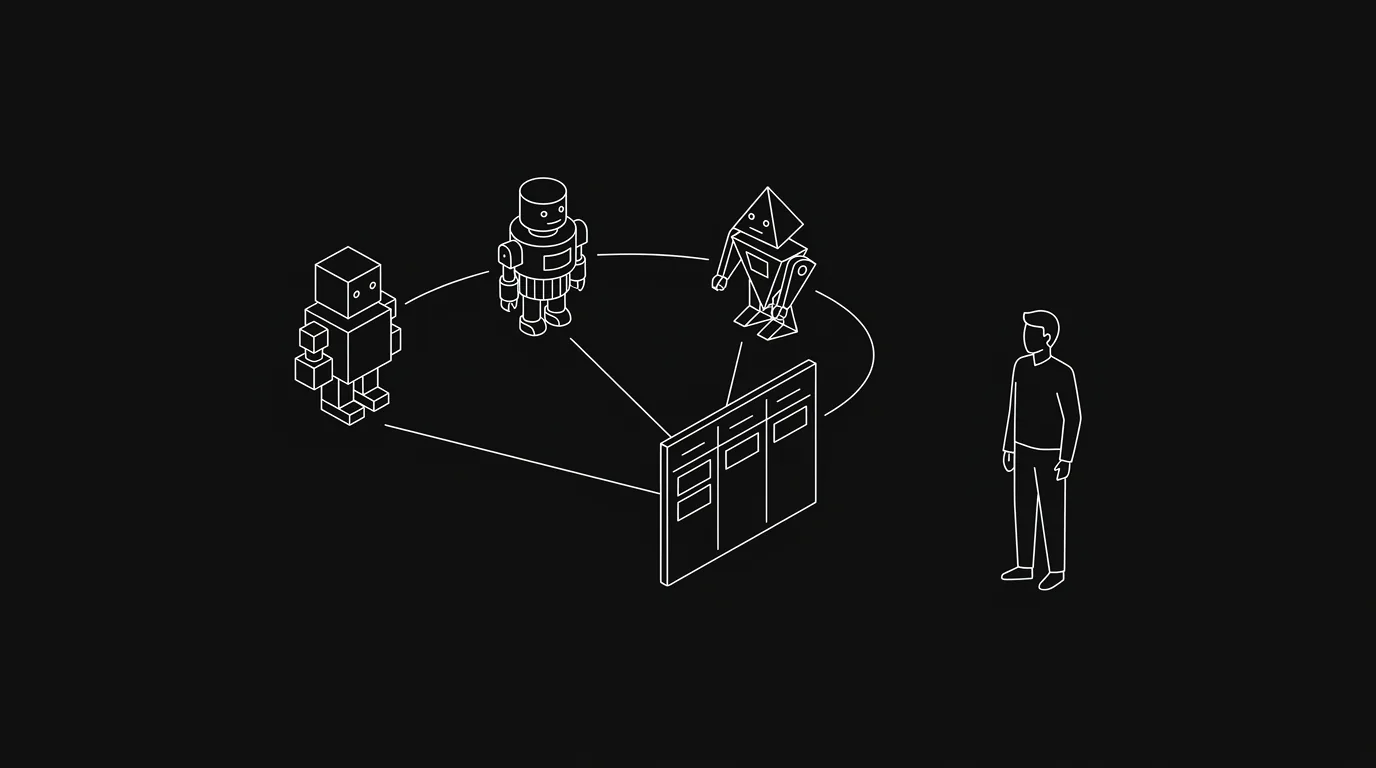
Managing one agent is straightforward. Managing three — a planner, a developer, and a QA agent — on a single project requires infrastructure that most teams don’t have yet.
The problem shows up as soon as you have more than one agent. Agent A creates a task. Agent B is supposed to pick it up. But Agent B has no way to know the task exists unless it’s checking the same board that Agent A posted to. And if Agent B finishes, Agent C (QA) needs to know where to find the output.
Without a shared board, this coordination happens in one of two ways: you route everything manually, or agents pass information to each other through increasingly baroque prompt engineering. Both approaches break at scale.
A shared project board with structured access solves the coordination problem at the infrastructure level:
- Agent A creates the task and moves it to “Review”
- Agent B checks its inbox, sees the assignment, pulls the task, does the work, posts a comment with results, moves to “Done”
- Agent C monitors the “Done” section, picks up completed tasks for QA, posts a QA result as a comment
- You see the full thread — creation, implementation, QA — in one ticket
Why a shared board beats a pasted task list in the first place is the case made in why your AI agent needs a real project board. The pattern generalizes to any MCP-compatible agent.
One practical note: agent-to-agent coordination via a shared board works best when each agent has its own handle. When multiple agents share an identity, the attribution trail breaks — you can’t tell which agent made a decision or posted a result.
The field guide to running a multi-agent team on one board turns this model into a claim, update, review, and recovery protocol.
The Bottom Line
- Multi-agent coordination needs a shared, persistent state layer — the project board is the natural place for it.
- Each agent should have its own identity on the board so their work is distinguishable.
- The inbox is the routing mechanism: agents check for assignments, pick up the highest priority item, and post back.
- The human’s role shifts from routing tasks manually to reviewing completed work and handling exceptions.
The Attribution Problem: Knowing What Your Agents Did
Here’s a failure mode that doesn’t get talked about enough: you run an agent on a batch of tasks, it finishes successfully, and two days later a bug shows up. You have no idea which tasks the agent touched, what decisions it made, or why.
This is the AI work attribution problem. It’s the project-management equivalent of “who changed this file and why” — except the entity that changed it can’t be held to account in a meeting.
Attribution in AI-agent project management requires:
A record of which tasks each agent touched. Not just “the agent ran,” but specifically which ticket numbers, which actions (created, moved, commented), and in what order.
The agent’s reasoning on the task itself. When an agent posts a comment saying “Deployed to production — fixed the login timeout by adjusting the session cookie expiry,” that reasoning lives on the task. You don’t need to dig through terminal logs.
A timestamp trail that matches the task history. If the board shows a task moved from “Doing” to “Done” at 14:32, and the agent’s comment was posted at 14:31, you can reconstruct what happened without inspecting CI logs.
Hypertask’s inbox and comment model provides this automatically when agents use MCP or CLI. Every action (move, comment, create) is recorded against the task with the agent’s identity and timestamp. The full attribution record lives in AI work attribution — knowing what your agents actually did.
The Bottom Line
- Attribution is not a nice-to-have once agents are doing real work — it’s a debugging and accountability requirement.
- Comments on tasks are better than terminal logs because they’re colocated with the work and visible to the whole team.
- Named agent identities (not a shared “system” account) are the minimum requirement for meaningful attribution.
- The attribution record you build now is the audit trail you’ll be glad you have six months from now.
Token Economy: Why Access Mode Matters for Cost
AI agents cost money per token. A task that takes Claude Code 50,000 tokens to complete might take 40,000 or 60,000 depending on how it accesses your project board. At scale, that difference is real.
The core issue: MCP tool calls carry overhead. When an agent calls hypertask_list_tasks, the MCP scaffolding — tool definition, parameter schema, response parsing — adds tokens to every round trip. For a single task that’s negligible. For an agent that checks the inbox 20 times per session, or searches for related tasks repeatedly, it adds up.
The CLI access mode is more token-efficient because it returns compact text output that the agent can parse directly, without going through the MCP tool call format. For scripted agents doing high-volume reads and writes, the CLI is the right default.
This isn’t a reason to avoid MCP — it’s a reason to choose the right tool for the job. MCP is correct for interactive agents in a conversation context. CLI is correct for automated loops running dozens of operations per session.
A few patterns that help manage token cost in agent workflows:
- Batch reads. Pull all open tasks once at the start of a session, rather than calling
get_taskper-item inside a loop. - Filter at the source. Use
--section "Todo" --priority urgentin CLI or the filter parameters inhypertask_list_tasksto return only what the agent needs. Don’t pull the full board and filter in the model. - Write results once. Post one comment with the full result at task completion rather than posting intermediate updates for every step.
- Use the inbox, not list.
hypertask_inbox_listreturns only items that need action — it’s a much smaller payload than listing all tasks on a board.
The Bottom Line
- Access mode (MCP vs CLI) affects token cost — choose based on your agent’s usage pattern, not just convenience.
- Filtering at the source (server-side) is far cheaper than pulling full task lists and filtering in the model.
- Batch reads at session start are more efficient than per-task reads inside loops.
- Token cost for agent-board interactions is a manageable design decision, not an inherent tax.
Comparing Tools: Which PM Software Supports AI Agents?
Most project management tools were not designed for agent access. Here’s an honest look at where the main options stand.
Notion
Notion is a flexible workspace, not a task manager. It doesn’t have a native CLI. Its API exists but was not designed for agent workflows — there’s no concept of task assignment to a non-human, no inbox for agents, no structured prioritization. Teams evaluating Notion for agent work tend to reach the same conclusion: it’s a strong place to hold information, but it can’t drive an agent workflow.
If Notion is your current workspace and you are deciding whether to keep task execution there, the Notion vs Hypertask comparison breaks down the docs-versus-task-board tradeoff directly.
If you are evaluating broader work suites, compare the agent workflow directly in the ClickUp alternative guide and the Asana alternative for human-agent execution.
Jira
Jira has a REST API, which means technically an agent can interact with it. But Jira’s API is complex, session-heavy, and returns verbose JSON that burns tokens quickly. There’s no CLI designed for agent use. Jira was built for humans navigating a browser — the API is a secondary interface, not the primary one.
Linear
Linear is fast and keyboard-first for humans. Its GraphQL API is well-documented and cleaner than Jira’s. But Linear has no MCP server, no CLI built for agent workflows, and no concept of an agent seat or agent-specific inbox. An agent can write to Linear via API, but it requires custom integration work per use case.
For a current Linear-specific comparison that accounts for Linear Agent and Linear’s official MCP server, see the Linear alternative guide.
Hypertask
Hypertask is the only project management tool currently built with agent access as a first-class design constraint. Both access modes (MCP server and CLI) are production-ready. Agents can be onboarded with their own identity, receive tasks, post progress, and communicate back through the same inbox that humans use. The board is genuinely shared — not a human board with an API bolted on.
| Feature | Notion | Jira | Linear | Hypertask |
|---|---|---|---|---|
| Native MCP server | No | No | No | Yes |
| Agent-optimized CLI | No | No | No | Yes |
| Agent seats / identity | No | No | No | Yes |
| Async inbox for agents | No | No | No | Yes |
| Keyboard-first human UI | No | No | Yes | Yes |
| Human + agent board view | No | No | No | Yes |
The Bottom Line
- None of the major PM tools (Notion, Jira, Linear) have a native MCP server or agent-optimized CLI.
- Jira’s REST API technically allows agent access but isn’t designed for it — high complexity, high token cost.
- Linear is the closest competitor for developer-focused human workflows, but lacks agent infrastructure.
- If your use case involves AI agents as regular participants in project work, you need a tool built for it.
Getting Started: Give Your Agent a Board in Minutes
The practical path from “I have an AI agent and a Notion board” to “my agent has structured access to a real task board” takes less than ten minutes. Here’s the shortest route.
Step 1: Create a Hypertask account. Sign up at hypertask.ai. Create a project and set up the sections that match your workflow (e.g., Todo, Doing, Done).
Step 2: Connect via MCP or CLI.
For MCP, add the server config to your Claude Code settings.json. Hypertask has one-click “Connect” buttons for Claude Code, Cursor, and Windsurf on the developer docs page.
For CLI, install the package and authenticate:
npm install -g @hypertask/hypertask_cli
hypertask auth login
Step 3: Create an agent seat. Give your agent its own email and invite it as a project member. When Claude Code or your agent acts on the board, its actions will be attributed to its own handle — not yours.
Step 4: Tell your agent what to do. In Claude Code (or your agent’s system prompt), include:
“You have access to a Hypertask board via MCP. At the start of each session, check your inbox with
hypertask_inbox_list. Work on the highest-priority task. Post your result as a comment. Move the task to Done when finished.”
That’s the core loop. For the case on why this beats pasting a task list into a chat window, see why your AI agent needs a real project board; the MCP integration docs cover the actual setup.
For a narrower operating checklist, the AI agent task management lifecycle breaks the daily loop into claim, update, report, and close steps.
If you are comparing the wider software category first, the AI task manager guide separates scheduling assistants, work suites, and agent-ready boards by the job they automate.
The AI project management software comparison covers client suites, workflow platforms, schedulers, and agent-ready boards. For calendar-first products, compare the Sunsama alternative for shared agent work and the Akiflow alternative for agent teams.
Pricing note: Hypertask has a free tier for small teams and individual agents. Agent seats are included in standard plans. See pricing and agent seats for current plan details. If you want a walkthrough of your specific setup, book a demo — it usually takes 20 minutes.
The Bottom Line
- Getting an agent onto a Hypertask board takes under ten minutes — MCP or CLI, your choice.
- The critical setup step that most people skip is giving the agent its own identity on the board.
- The core agent loop is simple: check inbox → pick highest priority → do work → post result → move to Done.
- Start with one agent on one project. Add more agents and boards once the pattern is working.
Frequently Asked Questions
What is the Model Context Protocol (MCP) and why does it matter for project management?
MCP is an open standard released by Anthropic in November 2024 that lets AI assistants connect to external tools and data sources through a structured protocol. For project management, it means an AI agent like Claude Code can call hypertask_list_tasks or hypertask_create_task directly in its conversation context — without you writing custom integration code. The result is agents that can read, update, and act on your task board as naturally as they write code. The Anthropic announcement and developer docs have the full technical background.
Can I use AI agents with Jira or Notion today?
Technically yes, with significant setup work. Jira has a REST API; Notion has an API. But neither tool has an MCP server, neither has an agent-optimized CLI, and neither has a concept of an agent seat with its own inbox. You’d need to build and maintain a custom integration. For teams where agent-board interaction is a core workflow (not a one-off experiment), that integration overhead is the main cost driver. Tools built with agent access as a design constraint save that setup time.
For current coverage of Atlassian’s official Rovo MCP server and remote-agent work, see the updated Jira alternative comparison.
What’s the difference between an AI assistant in project management and an AI agent?
An AI assistant (like Notion AI or Jira’s AI features) helps you do your work — it drafts descriptions, summarizes tickets, suggests priorities. It operates in your context window, for your session, and its output stays in the UI. An AI agent is autonomous: it picks up tasks independently, does work over a period of time, posts its own updates, and can hand off to other agents. The difference is autonomy and persistence — agents need a board they can operate on their own, not just a text box to fill.
How do I keep humans in control when agents are updating the board?
The practical answer is approval gates and the inbox. Agents can move tasks to a “Review” section rather than “Done” directly — this puts every completed item in your review queue before it’s marked finished. Hypertask’s inbox surfaces agent completions and any tasks that have new comments, so you can do a triage pass without manually checking every ticket. The key habit is defining clearly which sections agents can move tasks into autonomously and which sections require human review.
How many tokens does it cost to give an agent board access?
It depends heavily on access pattern. An agent that calls hypertask_inbox_list once at session start and posts one comment at the end adds roughly 1,000–3,000 tokens overhead per session — negligible relative to the work the agent is doing. An agent that queries the full task list in a loop, calls get_task per item, and posts multiple intermediate comments can add 10,000–20,000 tokens. The difference is mostly about filtering at source and batching reads. CLI access is more token-efficient than MCP for high-volume operations because it avoids MCP tool call scaffolding overhead.
What does “agent seats” mean in a project management context?
An agent seat is simply a user account on the board provisioned for an AI agent instead of a human. The agent gets an email address, a display name (e.g., @claude or @qa-agent), and project membership. When the agent creates a task or posts a comment, it shows under its own handle — not your account. This is what makes the attribution trail readable. Without named agent seats, all agent activity appears as you, and you lose the ability to distinguish human and machine contributions in the task history.
Is this only relevant for software development teams?
No, though software teams were the earliest adopters. The same infrastructure works for any team running agents as part of a regular workflow: content teams where an agent drafts posts and a human reviews; ops teams where an agent processes data and flags exceptions; research teams where an agent gathers sources and a human synthesizes. The common thread is: agent does work, human reviews and approves, both need to see the same board. That pattern isn’t specific to software.
What if my agent runs for a long time without a UI?
That’s exactly the scenario this infrastructure is built for. Long-running agents (20–40 minutes or more) can post intermediate updates as comments on the task without needing a UI. When the job finishes, the final result is the last comment. You check the inbox when you’re ready — not while the agent is running. The async comment model means you’re not staring at a terminal waiting for output; you’re seeing a summary in the task thread when the work is done.
Conclusion
The shift from “AI as assistant” to “AI as participant” is already happening. Teams running Claude Code, Cursor, and custom agent loops are already doing work on behalf of their company — they just don’t have good infrastructure for making that work visible and manageable yet.
The gap is a project board with a door agents can open. That means an MCP server or a CLI, named agent identities, an async comment thread, and an inbox that surfaces what needs human attention. None of that requires exotic technology — it requires a PM tool designed with agents in mind from the start.
Hypertask is built for exactly this. Both humans and agents work on the same board, with the same inbox, through the same access points. You see everything in one place, you stay in control, and your agents don’t need you to translate between them and the board.
Explore further:
- Hypertask features — full feature list including agent seats and MCP
- Developer docs — MCP setup, CLI reference, agent workflow patterns
- Why your AI agent needs a real project board — the case for live board access over pasted lists
- Why we let AI agents build entire boards, not just tasks — board-level autonomy
- CLI vs MCP — which access mode suits your agent
- AI work attribution — knowing what your agents actually did
- Todoist alternative for AI-agent task management
- Trello alternative for AI-agent project management
- monday.com alternative for focused human-agent execution
- Pricing and agent seats
- Book a demo